
Showing posts with label Photoshop. Show all posts
Showing posts with label Photoshop. Show all posts
Thursday, January 31, 2013
San Jose Sharks Panorama

Always love Photoshop's photostitching abilities... First time I broke out the little camera in a while, San Jose Sharks home opening game last week.
Thursday, May 19, 2011
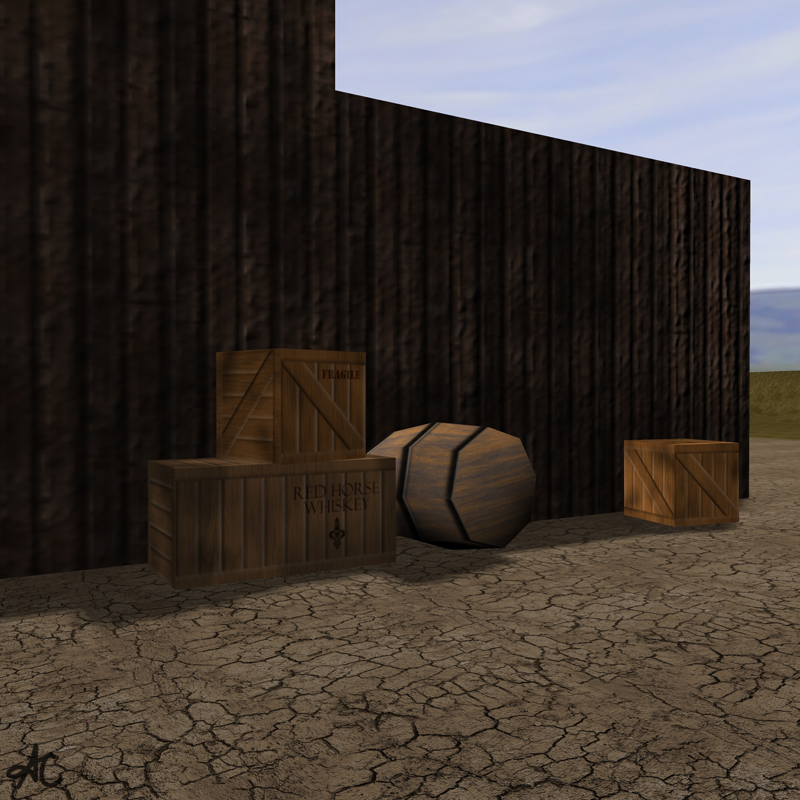
Saloon 3d Model and Textures
Here is my saloon for our hard surface modeling class's western town project. Textures are a combination of hand painted, photos I took, and a couple from the web. Main building and stairs 402 polys. 1024x1024 textures used throughout scene.




Monday, May 9, 2011
3d model "office building"
My "completed" (could always do more work on these things...) building, bump mapped and alpha applied to the window panes.
557 polys, textures all painted from scratch in Photoshop.

3d model mailbox
Learning how to use Zbrush and Maya together. Modeled low poly in Maya, then convert to high poly in Zbrush. Painted custom alphas in Photoshop then used them on the high poly model to create the text and detailing on the mailbox. Exported bump map from Zbrush to apply to the low poly Maya model.

Thursday, April 21, 2011
Just for fun - Go Sharks!
My birds again... because photoshopping them during the Giants postseason worked for SF! Go Sharks!

Friday, April 1, 2011
Photoshop homework
We were to replicate a tabloid with our own photos and some grabbed from the internet...
I had started a silly project on my own, which I then used in my homework assignment as well....
for fun --

for homework --

Wednesday, March 9, 2011
Self Portrait Vectors
Forgot to show my previous Photoshop homework. We had to do a self-portrait using a combination of effects and drawing shapes with the pen tool.

Postcard and Stamp Photoshop Assignment
We had an assignment for Photoshop II class to take photos and design a "Wish you were here" postcard (and matching postage stamp) about where we live. The idea was to portray it any way you want... I went in this direction:


Wednesday, December 22, 2010
Thursday, December 16, 2010
Merry Christmas
Here's this year's Christmas card from the boys, enjoy!
(Don't worry this was done in Photoshop. No WAY would I ever be able to put hats on them!)

Wednesday, October 20, 2010

Friday, September 24, 2010
Learning how to colorize black and white photos
I've been wanting to try this for a while now...
Googled this image and tried it out. Here is the before (black and white) and after (added layers of color in photoshop, touched up a little).
Before:


Tuesday, September 7, 2010
Free time in computer lab... gatorbanana?
Found some photos by doing a Google Image search. Here's what happens when I'm stuck in the lab for too many hours...

Thursday, August 12, 2010
Photoshop waterdrops tutorial
Found a pretty cool tutorial on how to make waterdrops and a foggy window look.
Props to the tutorial I followed: abduzeedo.com Foggy Window Effect
Here's my result! The background is a photo I took in Australia looking down on the city in the Sydney tower Restaurant.

Wednesday, July 28, 2010
Maya character project
Sooo this project took the whole duration of my summer school class in 3d Animation. I think I'm calling it done for now. I still have one day to do anything if I change my mind.
Our class created characters from nothing... so this meant all of the modelling, rigging, texturing, and animation from scratch.
Thursday, July 22, 2010
Break from Maya
Needed a small break from working on my Maya project...
Remembering how to use photoshop :)

Thursday, June 24, 2010
One (ok a few) more Panorama(s)
I couldn't believe I got this one together. I didn't take the photos very well to stitch them in Photoshop, but I managed to somehow! I reconstructed a lot of sky and water since I didn't have source image for it. Even though it was raining in Sydney this day, it was probably the most beautiful and memorable for this moment!

This one is at Darling Harbour:

This is another in Darling Harbour, of the Maritime Museum.

Tuesday, June 22, 2010
Australia Panoramas!
Ok so it's been a while since my last post, but for good reason. Had the most amazing vacation to Australia! Got to kayak with sea turtles, cuddle a koala, snorkel the Great Barrier Reef, climb the Sydney Harbour Bridge, oh yeah, and take thousands of photos while I'm at it.
Here's the start of my photo editing, just put together the panorama shots using photoshop CS5. Been very jetlagged while editing so I hope there aren't any screw-ups. Enjoy!
These are from the Blue Mountains about an hour's drive outside of Sydney. Very Grand Canyon-like but with some waterfalls.


These are in Sydney:


These are views from our hotel on Hamilton Island.
High tide:


Monday, May 24, 2010
After Effects Final Project
This is my final project for motion graphics class. We were supposed to do a James Bond movie intro. We chose our theme from a list of books that never made it to real Bond movies. I picked "Scorpius". The names I chose for the credits are actually the rumored real people for whatever James Bond movie may come in 2011.
Wednesday, April 7, 2010
A couple other edits
A couple of my other photos I took somewhat recently in my local travels...
A day at the beach...

A day at the farm?

Subscribe to:
Posts (Atom)


 Posts
Posts


